UNIT 4 DATABASE QUERY USING SQL
SQL is a unified, non-procedural language used for creating, accessing, handling and mnaging data in relational databases.
FUNCTIONS IN SQL
A function can be defined as a pre-defined set of commands that helps in performing certain operations to obtain either a single value or a result set.
SQL provides a large collection of in-built functions, also called library functions, that can be used directly with SQL statementsfor performing calculations on data.
The functions used in SQL can be categorised into two categories namely single row or scalar functions and multiple row or group or aggregate functions.
SINGLE ROW FUNCTIONS:
Single Row Functions operate on a single row or single value to return one value per row as the outout. they can accept one or more arguments but return only one result per row. These are also known as Scalar Functions. They can be used with SELECT, WHERE and ORDER by clause.

Numeric Functions:

STRING FUNCTIONS : SQL string functions help manipulate and format text data efficiently. They are widely used for cleaning, comparing, and extracting meaningful information from textual fields.
- Useful for handling names, addresses, and other text-based data.
- Essential for organizing, analyzing, and improving data quality.
LOWER(): Converts a string to all lower-case characters.UPPER(): Converts a string to all upper-case characters.TRIM(): Removes leading and trailing spaces (or other specified characters) from a string.LTRIM(): Removes leading spaces from the left side of a string.RTRIM(): Removes trailing spaces from the right side of a string.
LENGTH()(orLEN()in SQL Server): Returns the number of characters in a string.- INSTR() : Returns the position of the first occurrence of a substring within a given
- string.
LEFT(): Extracts a specified number of characters from the beginning (left side) of a string.RIGHT(): Extracts a specified number of characters from the end (right side) of a stringSUBSTRING()(orSUBSTR())/ MID ( ): Extracts a portion of a string starting from a specified position and with a specific length.


MySQL Date and Time Functions
MySQL provides built-in date and time functions that allow users to work efficiently with date-related data in databases. These functions help in managing timestamps, scheduling events, and performing calculations on dates, which are essential for applications that rely on time-based information. They are used to:
- Store and handle timestamps and scheduling data.
- Perform date calculations such as adding or subtracting days.
- Extract parts of a date like year, month, or day.
- Format date output for better readability.
1. NOW()
The NOW() function retrieves the current date and time in YYYY-MM-DD HH:MI:SS format.
Query:
2. SYSDATE()
3. DATE()
The DATE() function extracts only the date part from a DATETIME or TIMESTAMP value, discarding the time.
4. MONTH() : Returns the month from the given date passed as an argument to it.
Ex. Select Month('2026-03-28');
result: 03
5. YEAR(): Returns the year from the given date passed as an argument to it.
Ex. Select Month('2026-03-28');
result: 2026
6. DAYNAME() : Returns the name of the weekday.
Ex. Select dayname('2026-03-28');
result: Saturday
7.DAYOFMONTH() : Returns the day of month.
Ex. Select dayofmonth('2026-03-28');
result: 28
8.MONTHNAME(): Returns the name of the month.
Ex. Select monthname('2026-03-28');
result: March
9. DAYOFWEEK() : Returns the weekday index of the argument. Sunday is counted as 1.
Ex. Select dayofweek('2026-03-28');
result: 7
10.DAYOFYEAR() : Returns the day of the year.
Ex. Select dayofyear('2026-03-28');
result: 87

SELECT city , sum (salary) from Emp Group By city;
Here are the different types of JOINs in SQL:
1. Cartesian Product(Cross join)
A Cartesian Join or Cross Join returns the Cartesian product of two tables, meaning each row from the first table is combined with every row from the second table. This type of join does not require any specific condition or matching column between the two tables.
Syntax:
SELECT table1.column1 , table1.column2, table2.column1...
FROM table1
CROSS JOIN table2;
In the absence of a WHERE condition the CARTESIAN JOIN will behave like a Cartesian Product i.e., the number of rows in the result-set is the product of the number of rows of the two tables. In the presence of WHERE condition this JOIN will function like a INNER JOIN.
Consider the following two tables Student and StudentCourse:
| ROLL_NO | NAME | ADDRESS | PHONE | AGE |
|---|---|---|---|---|
| 1 | Ron | Vikas Puri | XXXXXXXXXX | 17 |
| 2 | Evin | JanakPuri | XXXXXXXXXX | 17 |
| 3 | Varun | Tilak Nagar | XXXXXXXXXX | 17 |
| 4 | Harsh | Uttam Nagar | XXXXXXXXXX | 17 |
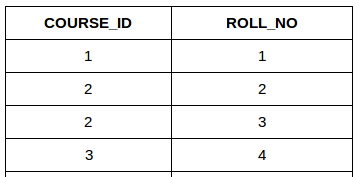
In a Cartesian Join, the number of rows in the result set is equal to the product of the number of rows in both tables. For instance, if Table A has 4 rows and Table B has 4 rows, the result set will contain 16 rows (4 * 4).
Query:
Output:
| NAME | AGE | COURSE_ID |
|---|---|---|
| Ron | 17 | 1 |
| Ron | 17 | 2 |
| Ron | 17 | 2 |
| Ron | 17 | 3 |
| Evin | 17 | 1 |
| Evin | 17 | 2 |
| Evin | 17 | 2 |
| Evin | 17 | 3 |
| Varun | 17 | 1 |
| Varun | 20 | 2 |
| Varun | 20 | 2 |
| Varun | 20 | 3 |
| Harsh | 18 | 1 |
| Harsh | 18 | 2 |
| Harsh | 18 | 2 |
| Harsh | 18 | 3 |
Explanation:
In this example, each row from the Student table is joined with every row from the StudentCourse table, resulting in 16 rows (4 students * 4 courses). This is the Cartesian product of the two tables.
2. Equi Join:
An Equi Join in SQL is a type of join that combines rows from two or more tables based on a common column or set of columns, using the equality operator = to compare column values
syntax:
SELECT <col1>, <col2> from <table1><table2> where <table1.primary key col>=<table2.Foreign Key Col>;
Ex.:
select A.rollno, A.name, B.course_id from student A , studentcourse B where A.roll_no=B.roll_no;
A) INNER JOIN
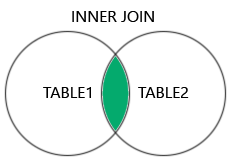
The INNER JOIN returns only rows that have matching values in both tables.
Tip: You can use just JOIN instead of INNER JOIN, as INNER is the default join type.
INNER JOIN Syntax
SELECT column_name(s)
FROM table1
INNER JOIN table2
ON table1.column_name = table2.column_name;
b) OUTER JOIN: It is categorised as RIGHT and LEFT Outer join.
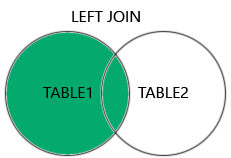
i) The LEFT JOIN returns all rows from the left table (table1), and only the matched rows from the right table (table2).
If there is no match in the right table, the result for the columns from the right table will be NULL.
The LEFT JOIN and LEFT OUTER JOIN keywords are equal - the OUTER keyword is optional.
LEFT JOIN Syntax
SELECT column_name(s)
FROM table1
LEFT JOIN table2
ON table1.column_name = table2.column_name;ii) RIGHT JOIN
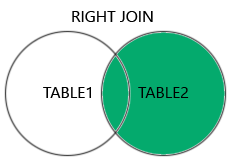
The RIGHT JOIN returns all rows from the right table (table2), and only the matched rows from the left table (table1).
If there is no match in the left table, the result for the columns from the left table will be NULL.
The RIGHT JOIN and RIGHT OUTER JOIN keywords are equal - the OUTER keyword is optional.
RIGHT JOIN Syntax
SELECT column_name(s)
FROM table1
RIGHT JOIN table2
ON table1.column_name = table2.column_name;The RIGHT JOIN keyword returns all records from the right table (Employees), even if there are no matches in the left table.
Ex.
Select A.rollno, A.name, B.course_id from student A RIGHT OUTER JOIN studentcourse B where A.roll_no=B.roll_no ORDER BY B.COURSE_ID DESC;
3. SQL Natural Join
A Natural Join is a type of INNER JOIN that automatically joins two tables based on columns with the same name and data type. It returns only the rows where the values in the common columns match.
- It joins tables using common columns with the same name.
- It returns only rows where values in those columns match.
- The common column appears only once in the result.
Example: Look at the two tables below:
Employee Table:

Department Table:

Example: Find all Employees and their respective departments.
Output:



Comments
Post a Comment